

Owner’smanual.
How to clip on, ride, charge and look after CLIP. Shorter than your commute.
- Range
- 6 to 8 mi Commuter, 12 to 18 mi Explorer
- Assist
- Up to 15 mph
- Charge
- About 40 minutes
- Weight
- 8.7 lb Commuter, 9.7 lb Explorer
- Fits
- 27 to 28 inch (700c) front tires. No suspension forks or cargo bikes.
- Certified
- UL 2271 and UL 2849
Book a one-on-one first ride. We set up CLIP with you and activate your warranty.
A note from Som
Thank you for choosing CLIP.
We designed CLIP to give the assist most city commutes actually need, at an affordable price, with a minimal manufacturing footprint. We call it the common-sense solution.
Together we are working towards a future where clean, sustainable mobility is the norm.
Thank you for being part of the journey.
Know your CLIP
Two pieces to know, CLIP and its remote, and the lights that tell you what each is doing.

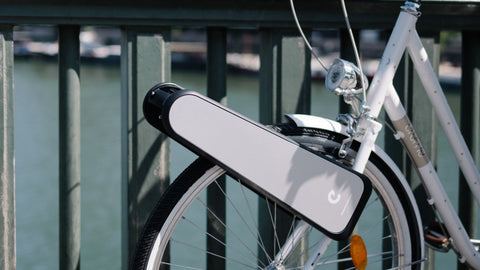
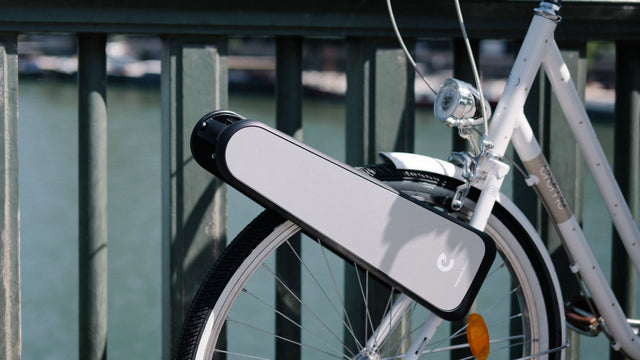
- 1Latch and handle. Slide the round button along the handle and rotate the handle forward to retract the clamp pegs, while holding CLIP with your other hand.
- 2Detachable remote. Boost and Regen buttons. Docks on CLIP to charge.
- 3Charge level indicator. Four LEDs on the side of CLIP.
- 4Fork pads. A fixed soft surface that rests on the front edge of your bicycle fork.
- 5Retractable clamp pegs. They rotate to a vertical position when you open the handle, and rotate back to horizontal when you pull the handle back to the closed position to grip the front fork.
- Four LEDs lit: fully charged
- One LED lit: under 25%, time to charge
- Blinking: plugged in and charging
- Running: Boost is engaged

- 1Rubber strap. Wraps the handlebar.
- 2Boost button. Hold while you pedal.
- 3Regen button. Brake and recharge.
- 4Charging dock. Magnetic. Docked, CLIP sleeps.
- Remote is fully charged
- Re-pairing with CLIP after docking
- Battery low, or Regen in use
- Remote is charging while docked
- CLIP charging, remote undocked
Attaching CLIP
Four steps, about 5 seconds, no tools. Front wheel only.


Strap on the remote
Undock the remote and strap it to the handlebar, where your thumb reaches the Boost button while you ride.
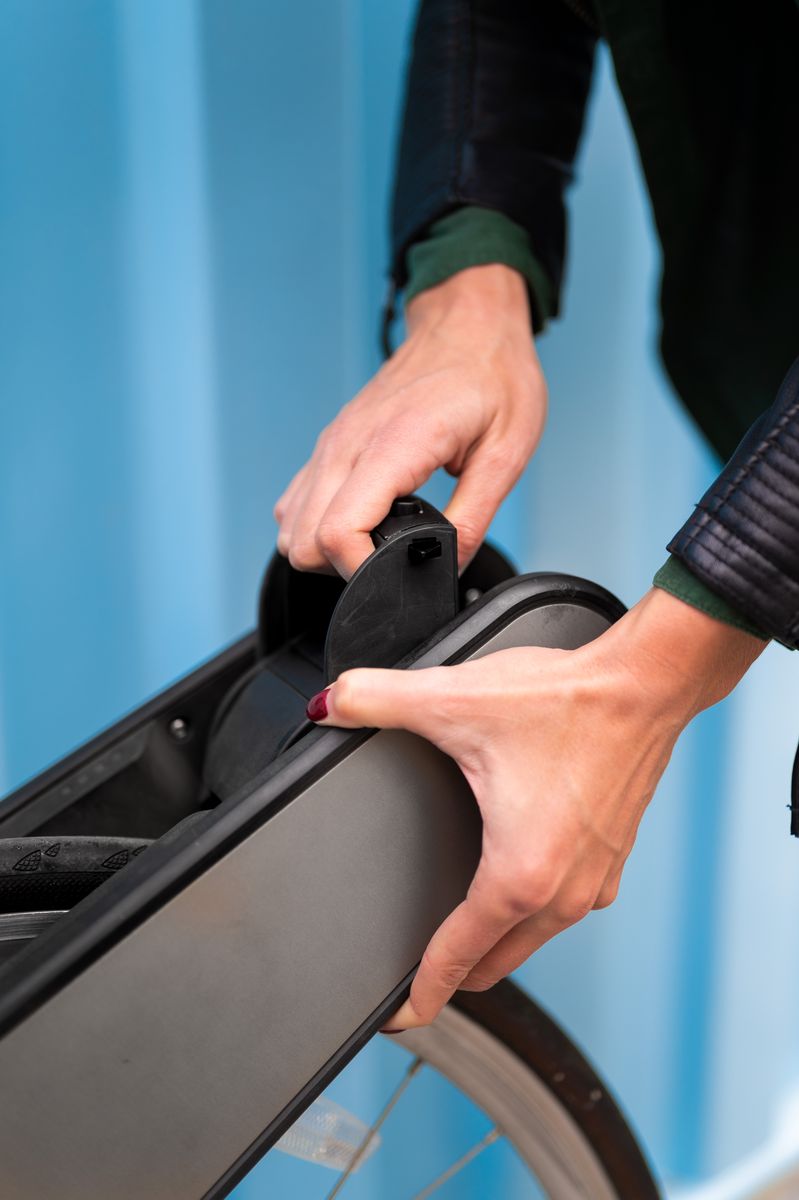
Unlatch CLIP
Unlatch the handle and rotate it forward to retract the clamp pegs.

Position CLIP
Set CLIP over the front wheel so the fork pads rest on the fork and the red roller rests on the tire.

Lock it on
Holding CLIP in position, pull the handle towards you until it clicks into place.
How to set up your CLIP.
Attach, detach and ride, in 8 minutes. If anything feels off, follow along here, or email support@clip.bike with a photo of your bike.
Riding with CLIP
Pedal and it helps. Press for more, hold white to recover energy.

Pedal as usual. CLIP adds the push.
- Assist
- Up to 15 mph
- Modes
- Ride-along, Boost and Regen
- Range
- 6 to 8 mi Commuter, 12 to 18 mi Explorer
- Brakes
- Your bike’s own, always. Regen helps on descents.

Ride-along
Just pedal. CLIP assists a little even when you’re not pressing Boost, so at low speeds it feels like riding a lighter bike.

Boost
Press the red button while you pedal and hold it for as long as you want the assist, up to 15 mph. Boost pulls hardest once you’re rolling, so pedal off from a stop first.

Regenerative braking
On a descent, press and hold the white pill-shaped button to slow down and send energy back to the battery. It glows red while held. Use it with your bike’s brakes.
Safety
Thirty seconds of checks before every ride.
- Attach CLIP to the front wheel only, never the rear.
- With the remote undocked, CLIP is awake.
- Never turn the motor by hand while CLIP is off the bike.
- Do: Fits city, road and hybrid bikes with 700c tires. Compatibility list
- Don’t: Don’t use CLIP on a bike with a suspension fork, or on a cargo bike.
- Do: Not sure? Email us a photo of your bike before you ride.
- Do: The red clamp pegs sit horizontal, gripping the fork.
- Do: The red roller is centered on the tire.
- Do: Tire pressure is above 60 PSI. CLIP rides best at 70 to 80 PSI.
- Do: Your bike’s own brakes work well.
- Do: Keep to 15 mph or under, CLIP’s top assisted speed.
- Do: Slow down for bumps and avoid big ones at speed.
- Don’t: CLIP is not built for off-road riding.
- Don’t: Don’t use regenerative braking on a bumpy descent.
- Certified
- UL 2849 e-bike electrical system, tested by SGS (OSHA NRTL). Battery to UL 2271.
- Mounting
- Front wheel only, on a rigid fork
- Top speed
- 15 mph assisted
- Temperature
- Use between 0°F and 100°F
- Charger
- Use only the CLIP charger supplied
- Battery
- Lithium-ion, capacity on the product marking
- Do not use CLIP if it cannot be attached securely as instructed.
- Do not store, ride or charge CLIP in wet locations. Rain can damage the internals.
- Warning: risk of fire and electric shock. The battery and its components are not user replaceable.
- Do not put CLIP in household waste. Recycle it under local, state and federal rules, or ask us.
- AVERTISSEMENT : pour prévenir les blessures, l’utilisateur doit lire le manuel d’utilisation.
- AVERTISSEMENT : risque d’incendie. Aucune pièce ne peut être réparée par l’utilisateur.
Caring for CLIP
Little maintenance, a few good habits.

- 01 Cleaning
Wipe CLIP clean with a microfiber cloth and soapy water.
- 02 Charging
Bring CLIP inside, connect the CLIP charger and plug it into a nearby outlet. Empty to full in about 40 minutes.
- 03 Storing
Dock the remote into CLIP, charge to about 75%, and keep it somewhere cool and dry.
Need a spare? Extra chargers are $59 and replacement remotes $49. Accessories
Troubleshooting
Most rides that feel off have a quick fix.
-
CLIP pulls even when I’m not pressing Boost.
That’s ride-along, by design. CLIP adds a little assist as you pedal, so at low speeds it feels like riding a lighter bike.
-
I’m holding Boost but getting less than usual.
After a long boosted climb on a hot day, a protection circuit eases off the motor for a while so it doesn’t overheat.
Pedal to pick up some speed, then boost again. Boost is strongest once you’re moving and weakest from a standstill.
-
Not enough boost on a steep hill.
CLIP is built for hills, but you still need to pedal. Check it’s mounted with firm contact on the tire and that your tire is pumped to 70 to 80 PSI.
-
My battery drained before my ride.
Dock the remote so CLIP goes to sleep. If it’s already docked, take it out, clean any dust off the magnetic connectors on the remote and on CLIP, and re-dock.
The remote light should go yellow, then blue, then off. White means CLIP is plugged in and charging.
-
The roller isn’t perfectly centered on my wheel.
Mounting position varies from bike to bike, and you’ll still get plenty of assist slightly off-center. You can mount CLIP higher or lower on the fork.
Center it on the fork and wheel before you latch the handle. CLIP won’t correct itself during a ride.
Still stuck? Email support@clip.bike or call 917-970-7467 to set up a video call, or a visit to our lab in Brooklyn.
Warranty
12 months, limited, on manufacturing defects. Extend it a year with CLIPCARE, $99.
Full support
If you find a defect in materials or workmanship, we repair your CLIP or replace it with a new or refurbished unit in the same or better condition. We cover all shipping.
Continued care
We repair manufacturing defects at no charge, using new or refurbished parts. Shipping is not included in this period.
Not covered: accidents, normal wear and tear, or a CLIP altered or repaired by anyone we haven’t authorized. Valid for CLIPs bought from us or an authorized dealer. Returns accepted within 30 days. Full warranty terms

Questions
More in the full FAQ.
CLIP is a portable device that turns the bike you already own into an e‑bike. It clips onto your front wheel in about 5 seconds, with no tools, for a fraction of the price of a new e‑bike.
CLIP fits city, road and hybrid bikes with a 27 to 28 inch (700c) front tire, with any fork stem thickness. It is not for suspension forks or cargo bikes.
Check the compatibility list, or email a photo of your bike (with the make and model if you know it) to support@clip.bike and we will confirm the fit. In Brooklyn, we can also book you a demo.
We cover all shipping costs for the first 6 months. With CLIPCARE, we cover shipping both ways for the full 24 months.
The warranty covers manufacturing defects. It does not cover accidents, normal wear and tear, or a CLIP that has been altered or repaired by anyone we haven't authorized.
It is valid for CLIPs bought directly from us or from an authorized dealer.
A lithium-ion pack, UL certified, designed for performance and safety:
Small lithium footprint. Designed for minimal environmental impact.
Regenerative charging. Recaptures energy when you brake or ride downhill.
Dedicated battery management system. Every pack regulates its own charging and discharging to stay healthy and safe.
Months 1 to 6, full support. If you find a defect in materials or workmanship, we repair your CLIP or replace it with a new or refurbished unit in the same or better condition, and we cover all shipping.
Months 7 to 12, continued care. We repair manufacturing defects at no charge, using new or refurbished parts. Shipping is not included in this period unless you have CLIPCARE.
Extend your warranty by a year with CLIPCARE, $99. It also covers shipping both ways for all 24 months.
CLIP Commuter and Explorer ship across the US from Brooklyn, usually within a week, and to France, the Netherlands and Germany from our hub in Nice, France. neon ships to the US and EU from March 2027.
Impact
What your rides add up to, from factory to commute.
than a typical e-bike.
than an electric car.
the impact of a typical e-bike.
With NYSP2I, we ran a high-level comparison of energy use and greenhouse gas impact for CLIP against cars, public transit and walking. It found potential to cut the annual emissions of NYC commuters by about 12,900 metric tons CO₂e.

Email support@clip.bike or call 917-970-7467, weekdays, 9am to 5pm Eastern.